
Build Your Organic Social Presence with AI
A Way to Grow before Buying Ads
You're running a business and want more people to find it. But you may not want to spend on ads before you know what your customers actually respond to. Good news — you can start building an online presence, post on social media, and attract new customers with no marketing budget. Someone might discover your post, find your business on a map, hear a recommendation, or get a helpful answer from you in a comment section. These are all ways people can reach you organically.
Organic marketing helps people discover and trust a business without paying for placement. Paid marketing buys placement or reach, such as a search ad or a boosted social post. The same platform can work both ways. For example, an ordinary Instagram post may reach people through recommendations and shares, while a boosted post shows your content to an audience you pay to reach.
Organic growth doesn't require an ad budget, but it does take attention and effort. AI can make that effort manageable. This course focuses on using AI to boost your business's presence on social media. You'll choose a starting channel, make a social media profile clear for your target audience and potential clients, discover and select post ideas, create content, and build a content plan.

What Organic Marketing Looks Like in Practice
Organic marketing combines several approaches and can happen in several places:
- Social media: Share posts that show your work or answer customer questions. This helps new people discover your business and gives them a reason to follow or contact you.
- Search and maps: Keep your business listing, location, hours, and contact details current. This helps people find you when they're already looking for a nearby option.
- Customer conversations: Answer questions in comments, messages, or other places where customers talk to you. Useful answers build trust and show you what people need to know before buying.
- Reviews and referrals: Invite happy customers to leave an honest review or recommend your business to someone they know. Their experience can give new customers confidence to try you.
- Local partnerships: Partner with a complementary business to share a useful idea or recommend each other. This introduces you to people who may already trust that business.
Let's see what organic marketing looks like in practice. Meet Riverside Blooms — a flower shop that doesn't have a marketing budget but wants to grow its business through social media.
| Way to show up | A concrete move for Riverside Blooms | How AI can help |
|---|---|---|
| Social media | Show bouquet examples and answer a common flower-choice question | Turn the owner's answer and photos into post ideas, captions, and a simple plan |
| Search and maps | Keep the shop's location, hours, and contact details current | Draft a clear business description from confirmed details |
| Customer conversations | Answer questions about choosing, pickup, and ordering | Group recurring questions and draft replies for the owner to check |
| Reviews and referrals | Invite a happy customer to leave an honest review or tell a friend about the shop | Suggest a natural follow-up message, without inventing praise |
| Local partnerships | Team up with a nearby bakery on a birthday idea and refer customers to each other | Brainstorm a useful collaboration and draft a first message |
You can start all five without paying for ads. Make your media presence useful: keep details accurate, answer people, and follow through. That work can help attract new customers while showing you what they respond to. If you later decide to pay for ads, those insights can help shape a campaign.
Now you know what organic marketing is and what it includes. Let's start with social media. Next, you'll choose a channel where your customers spend time and then set up a profile that makes it easy to discover your business.
Choose a Channel and Make Your Profile Clear
Choose Where to Start
Trying to post everywhere at once can turn a small marketing task into a full-time job. Start with the place where your likely customers already look for businesses like yours and with a format you can make well.
Look at the questions customers send you, the platforms they mention, and how similar businesses show their work. You can ask a few customers where they would look before buying. Then match that evidence with the time and material you have. AI can help find and compare the options, but it shouldn't invent where your customers spend time.
For Riverside Blooms, Instagram is a reasonable first choice: the shop has real bouquet photos, and visitors can browse them before ordering. Facebook may also help it reach local residents.
Now the business needs to focus on its Instagram profile, including practical information and answers to potential clients' questions.

Make an Instagram Profile Useful at a Glance
Imagine someone taps through after seeing a bouquet post. In a few seconds, can they tell what the shop offers, where it serves people, and how to order? That's the job of the profile.
For Instagram, check these parts together:
| Profile part | What to make clear |
|---|---|
| Name and photo | Use a recognizable business name and an image that reads well as a small circle |
| Bio | State the offer, relevant area, and next step in short lines |
| Contact path | Make sure the DM instruction, link, or contact option lets customers reach the business through a channel it actually checks |
| Evidence | Show real work and useful details that support the bio |
| Accuracy | Keep service details current and leave out promises the shop hasn't confirmed |
Instagram bios have limited space, so every line has a job. Creativity is always welcome, but a poetic slogan alone won't tell a buyer how to order. So, make sure that your bio covers all the practicalities. AI can help you with that. It can draft a few bio versions from the business's real details, and you need to check the facts, tone, and length before using one.
Another important aspect of your profile is a consistent visual style. It matters because it helps people recognize your business across posts. This way, your unique style stands out from competitors, and the profile looks visually balanced. For example, Riverside Blooms could use a few brand colors, keep lighting consistent for bouquet photos, and keep cover text large enough to read on a phone.

You don't need a perfect-looking grid before you can start — an informative, accurate profile helps your business more than a visually stunning one that can't answer the most common customer questions.
The same profile principles apply to other platforms, but each profile requires you to fill in different details:
- On a Facebook Page, check the About details, location, hours, contact route, and action button
- On a LinkedIn Page, a clear company overview, industry, website, location, and a professional reason to contact the business matter more
AI can help with both the look of your profile and the wording people read first. Give it real facts about your business and the action you want visitors to take. Ask for something distinctive, but check that a new customer can still understand the offer, the relevant location, and the next step.
An AI draft is only useful if a new visitor can understand and act on it. Compare two Instagram versions for Riverside Blooms and decide which one does that better.
Compare Two Profiles Before a Customer Does
Here are two Instagram profile previews for Riverside Blooms. They use similar bouquet photos, a similar visual style, and the same follower count. Look at what each one tells a local customer looking for birthday flowers.
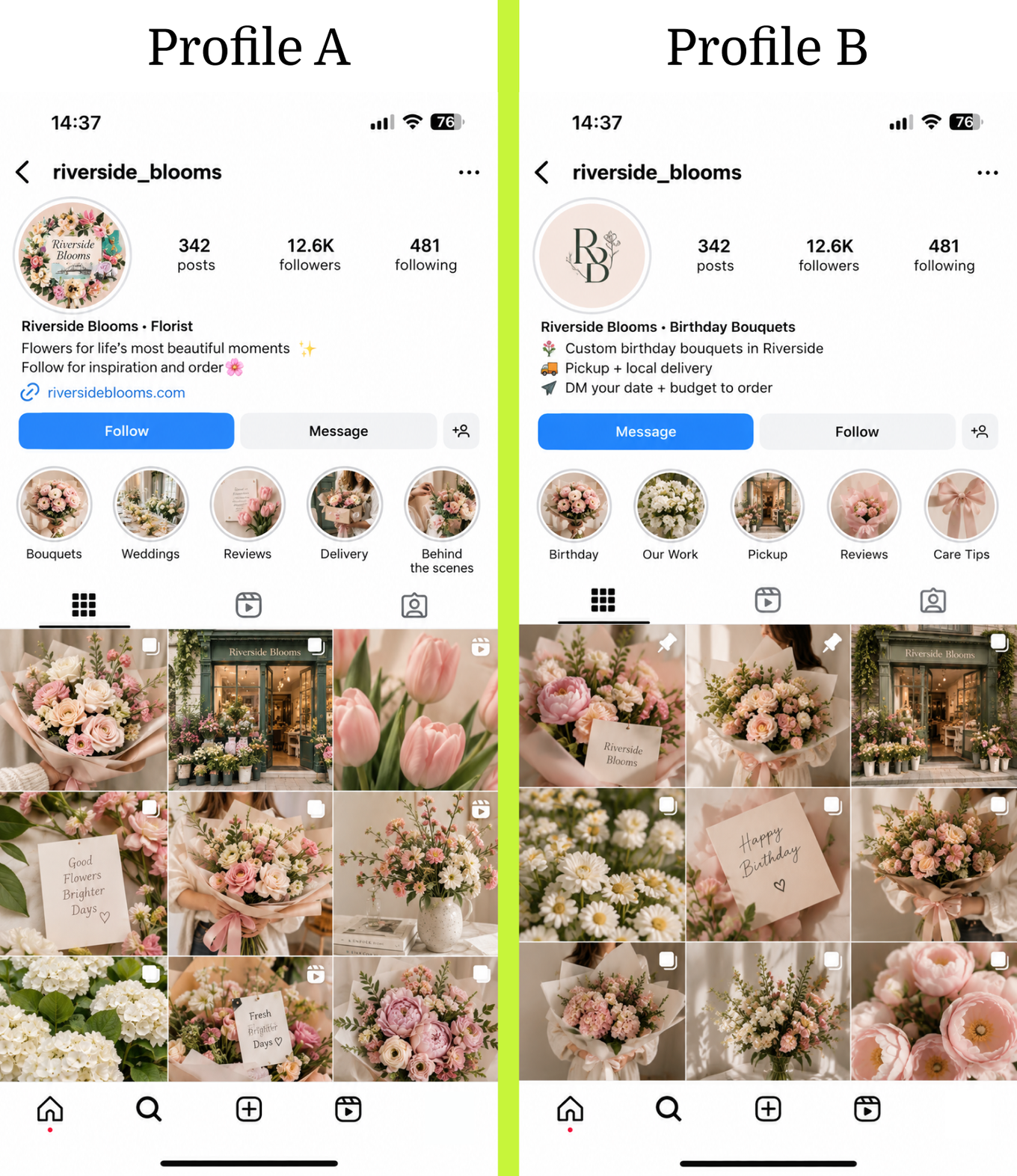
Which profile makes it easier for a local customer to order a birthday bouquet?
What makes this profile more informative and useful for the customers?
The first step is done, and the profile is ready. Now it needs posts that help new people find it and give potential customers enough information about your product or service. Let's see how to generate content ideas for valuable posts.
Find Post Ideas with AI
Find Ideas People Might Notice and Use
Once your profile is informative and visually inviting, the next question is what to post so potential customers can see it. The post needs to catch the attention of the right people, whether they already follow you or are discovering you for the first time.

When a Post Takes Off
An organic post may reach new people through shares and platform recommendations. If it spreads far beyond the account's usual audience quickly, people call it viral. For a small business, that is genuinely helpful — it can bring a burst of attention without paying for ads. The new viewers may become followers or ask about the business.
For a business, even a viral post should do more than collect views: it should help the right people understand something or take a next step. Check whether the idea has:
- A clear opening: Show the customer question, contrast, or result in the first line or visual so the right person knows why to stay
- A useful payoff: Answer the question, show a real process, or help someone choose instead of stopping at a catchy hook
- A reason to share: Make the idea easy to send to someone with the same question or need
- A clear connection to the business: Show what you actually offer and give interested people a natural next step
For Riverside Blooms, a short comparison of two bouquet styles could open with “What if I don't know their favorite flowers?” The visual contrast may catch attention, while advice on choosing makes the post useful. Real bouquet photos and a DM instruction help a nearby viewer act on it.
Viral posts often build on what people are already watching on a platform: a current topic, a familiar format, an editing style, or a running joke. That can include playful content such as memes or lighthearted videos. If a trend fits your audience, don't be afraid to use it. It may help your post travel beyond your followers without an ad budget. Keep the useful payoff: answer a question, show something real, or help a customer take a next step.
AI can help research current trends and show which ones fit your business. Give it your audience, goal, and available material, then ask it to find recent examples it can actually access. A trend gives you an idea to try; reach will still vary.
A trend can help people notice a post. The questions they ask your business can show what that post should help them understand.
More Sources for Engaging and Useful Posts
A potential follower who discovers Riverside Blooms through social media recommendations and visits their profile might ask, “How do I choose flowers?” “Can I pick them up?” “What happens after I message?” Some of these questions are already covered in the bio, but some are more useful to answer in posts. A post should be interesting to watch and help someone make a decision.
When generating ideas for your posts, make sure to check these useful sources — they'll help you to create a post around a genuine value you can bring to the potential customer. AI can use details from those sources to suggest angles you may not have considered.
| Source | What to give AI | A flower-shop example |
|---|---|---|
| A customer question | The exact question and the owner's answer | What to choose when you don't know their favorite flowers |
| A real process | A few steps and photos or clips from the shop | How two bouquet styles are put together |
| Reviews or comments | Feedback the shop may use, with private details removed | A post answering a pickup question from an actual comment |
| Search questions | Questions customers might type, checked against what the shop offers | How far ahead to order a birthday bouquet, once the owner confirms the answer |
| A current format or trend | A link, clip, or current trend data the tool can inspect | A quick “two styles, one question” video using real bouquets |
| An earlier post | Its result and the questions it raised | A follow-up answering what viewers asked about ordering |
AI can use these techniques together in one conversation. It can study sources it can access, spot patterns, ask you for the business details it can't know, and turn the strongest answers into post ideas:
- Cluster questions: Group similar customer questions into themes for a series of posts
- Compare patterns: Examine earlier posts or current trends and explain what caught attention, using examples it can check
- Reframe one answer: Turn a confirmed answer into a how-to, comparison, behind-the-scenes story, or quick video idea
- Interview you: Ask about your customers, your process, and what you can show before suggesting an idea
The interview will guide that combined process. AI can use the other techniques as it asks questions, then organize the ideas for your review. This is especially useful when you know your business well but haven't turned that knowledge into content yet.
Interview the Owner and Choose an Idea
Let AI Interview the Business Owner
In an AI interview, the tool asks one question at a time and uses your answers to uncover post ideas. The owner can describe real customer questions and how the business responds. AI should also ask what the business can show before it turns an answer into a claim.
Try the interview yourself. The prompt tells AI which questions to ask and what to give you after the answers.
Check the example of how the flower-shop AI interview can start:
AI: What do people ask before ordering birthday flowers?
Owner: What to choose when they don't know the person's favorite flowers.
What should AI ask next to find a useful post idea?
The owner answers the next questions: the shop asks about the occasion, colors, and budget, then suggests two styles. It includes photos of two bouquets it made, and the exact flowers vary based on availability. AI now has a customer question, the owner's method, something real to show, and a limit to respect. So it can propose the first content ideas for the owner to review.
You now have several ideas from customer questions, trends, and the interview. Next, evaluate them and choose the strongest ones. Compare them with what customers need, what the shop can show, and what the business wants to achieve.
Choose the First Idea
The interview may produce more ideas than the shop has time to make. Before creating any content, decide what the first post needs to accomplish. For example, Riverside Blooms wants more birthday bouquet inquiries, so an idea that helps to achieve this goal is especially useful.
Use four checks to compare ideas:
- Customer interest: Ask whether it answers a real question or shows something people care about
- Something to show: Check for facts, photos, examples, or a real process that can support it
- Business action: Check whether it helps someone take a useful next step, such as asking, booking, or ordering
- Effort and timing: Check whether you can make it with the time and material you have now
After the interview, AI organizes the ideas in the table you asked for: what the idea is, what works, and what still needs attention. Use the four checks above to compare the ideas and decide what to make first. For Riverside Blooms, the interview could produce these three angles:
| Idea | What works | What needs attention |
|---|---|---|
| How to choose birthday flowers when you don't know the recipient's favorite flowers | Answers a question that may hold up an order. The owner's method and photos can show the answer | Confirm the photographed bouquet styles are available, even if exact flowers vary |
| Which of these two bouquet styles would you pick? | Uses the photos, demonstrates the product, and could start a conversation | It gives less help to someone unsure how to order |
| What happens after you DM the shop? | Explains the ordering process, making it feel easier | Confirm the ordering process and the next steps before describing them |
Which idea is the strongest first post for this shop's goal?
The owner checks the two photos and confirms they show bouquet styles the shop can still make. The exact flowers may change, and the post will say so. With that detail settled, the idea is ready to turn into a post.
Next, it's time to produce the content. Choose a format that fits the platform where you post and the material you have.
Choose a Format and Build an Instagram Post
Choose a Format before Asking AI to Create
An idea is your post foundation. The next step is production. Finding visuals, writing a caption, and getting everything ready to post can take more time than choosing the topic. AI can help prepare all those pieces from a clear brief.
A good post gives the audience a reason to stop, one thing to learn or notice, and a next step that fits the business. It might be text, a photo, a video, or a mix. Each platform offers different ways to package that answer:
- Instagram: Single-photo or video posts, stories, and carousels can show products, comparisons, or steps. Reels turn an idea into a short vertical video, and captions add context and a next step.
- Facebook: Text, photos, and videos can share updates or answers. Local details and a clear way to contact the business help readers act.
- LinkedIn: Text posts, images, and videos can frame an idea around a professional or business need
- TikTok: Short vertical videos or photo posts can show a process or answer quickly, with on-screen context or a familiar format
- YouTube: A Short can deliver one quick answer, while a longer video can teach a fuller process; the title should make the topic clear
Once you have an idea, choose how people will experience it. A trend may already come with a format, and AI can help work out what your business would show within it. For a customer question or another idea without a set format, AI can compare options based on your platform, the material you have, and the action you want the customer to take.
For Riverside Blooms, the flower-choice question isn't tied to a set trend format. The shop can use its real bouquet photos. Here are a few ways this same idea could take shape on different platforms:
| Platform | A format for this flower-shop idea | What to make clear |
|---|---|---|
| A photo carousel with two bouquet examples, a short caption, or a Reel | Show the bouquets clearly, answer the flower-choice question, and invite viewers to DM | |
| A photo post with local context and an order step, or a short video | Make location, pickup or delivery, and messaging easy to spot | |
| A text, image, or short video post if the shop serves a professional audience | Connect the idea to a workplace need, such as a team gift, rather than copying a consumer caption | |
| TikTok | A vertical video of the choice or making process | Show the question early, then let the footage deliver the answer |
| YouTube | A Short that stands on its own, or a longer how-to video | Make the topic clear in the title and show the promised tip |
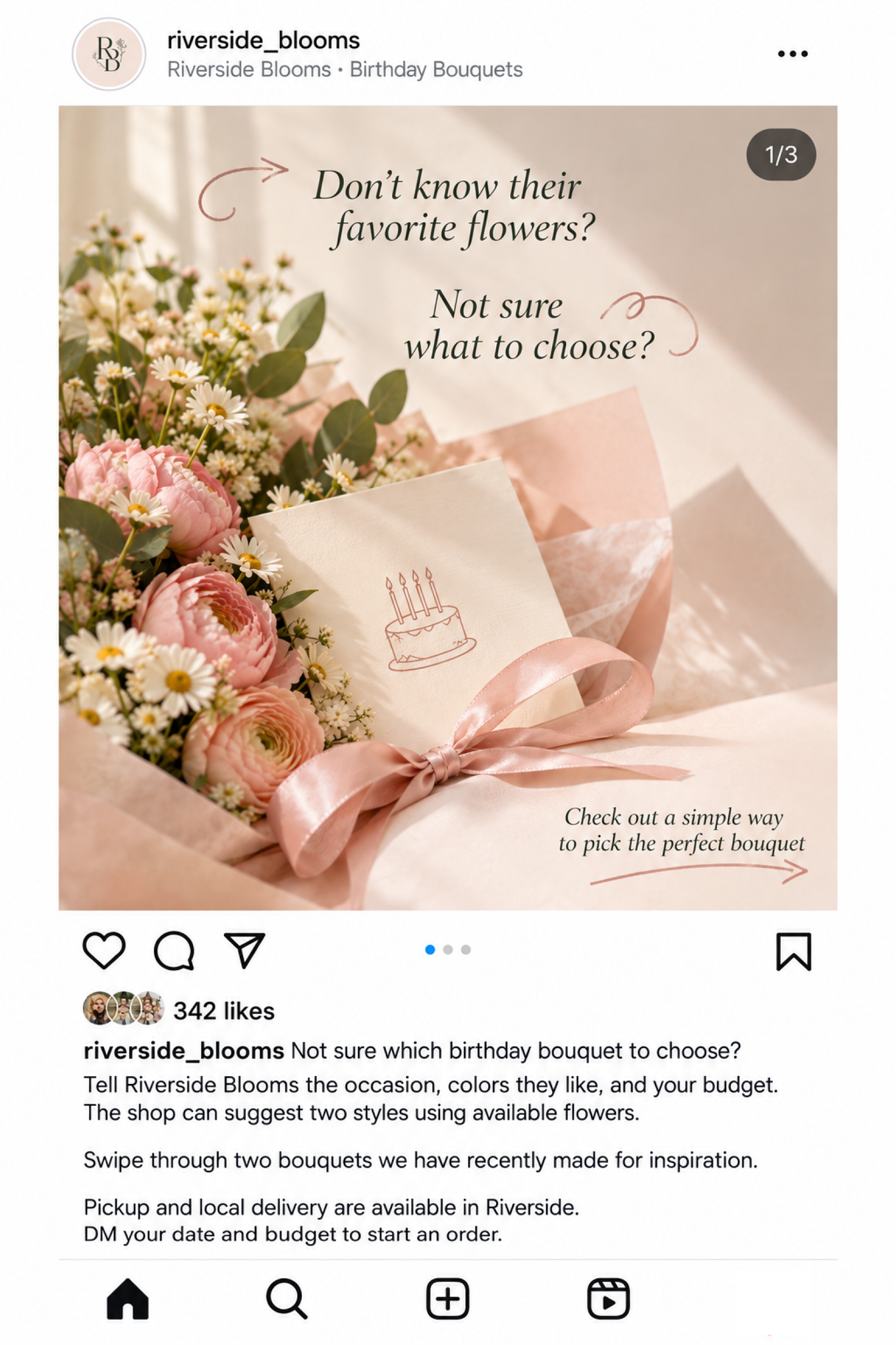
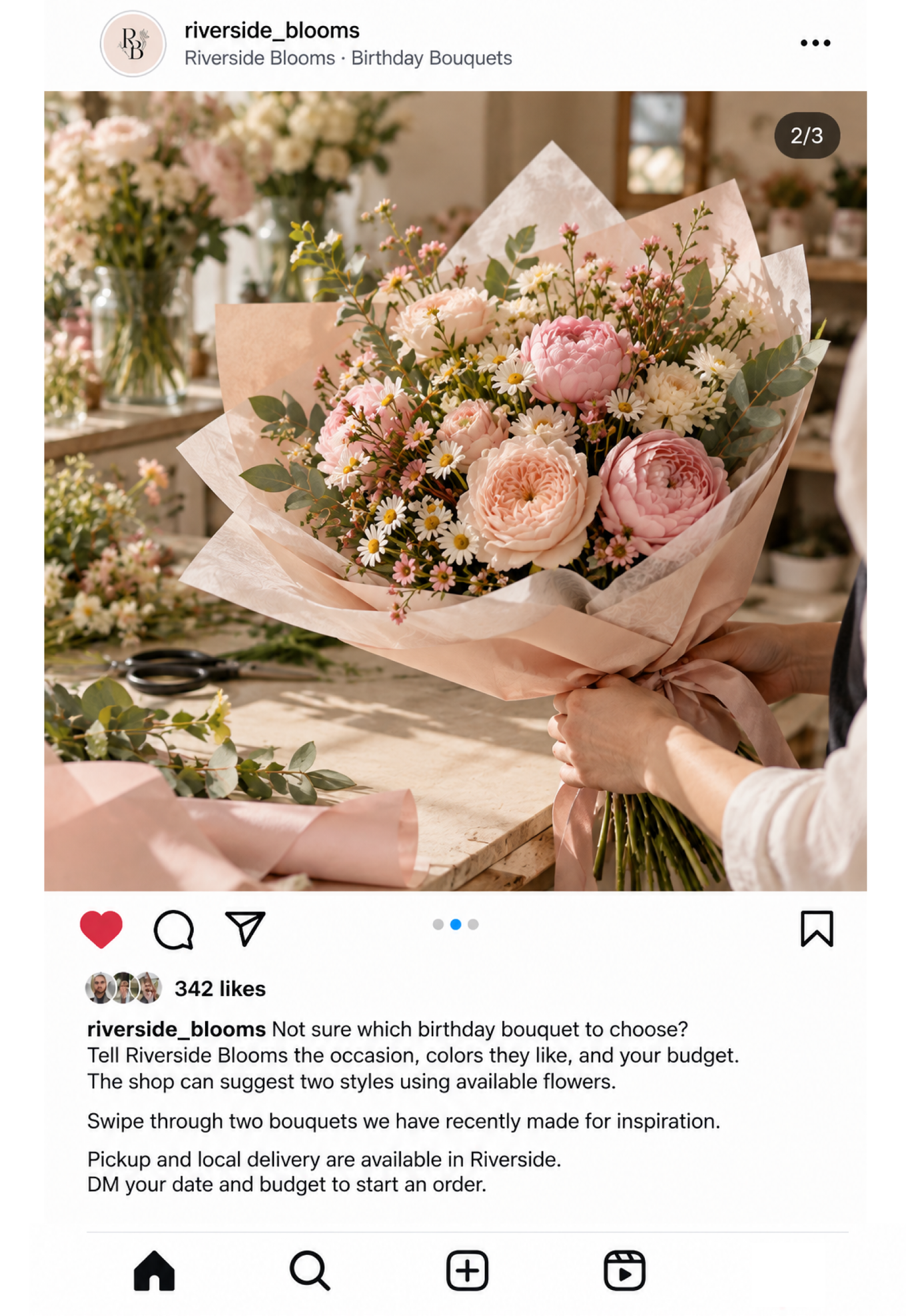
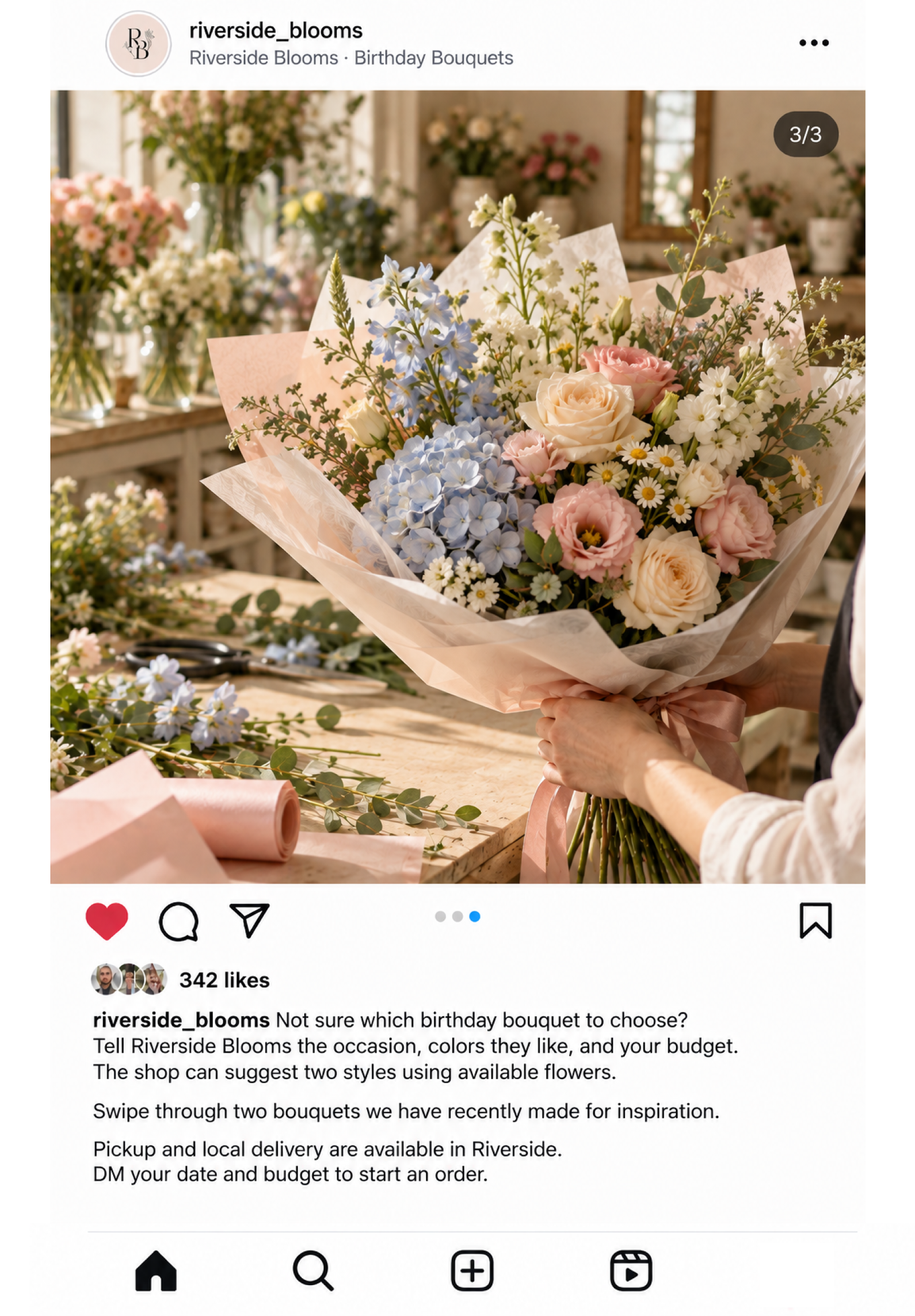
For Instagram, AI could recommend a carousel: open with the customer's question, then show two bouquet styles in photos the shop already has. The owner chooses it for the first post. AI will generate a supporting cover: a birthday card and ribbon, with questions added on top.
Now the shop can brief AI on both the visual and the words. Let's see how to create a post and what a good AI brief looks like.
Build the Instagram Post
A good AI brief doesn't have to be long. Give the audience, the customer question, confirmed business facts, available photos, the format, and the next step. Tell AI what it must leave out.
Afterward, AI will suggest a visual direction and specific ideas. For Riverside Blooms, a three-slide carousel could open with the question and show two real bouquet styles. A caption can help someone choose and explain how to order. The cover could be an AI-generated birthday card with ribbons, with the questions overlaid.
Now the cover needs its own brief. You can generate an image in the same chat asking AI to implement this idea, or use a separate visual brief.
Tell the AI tool that supports image generation the following facts:
- Where the image will appear
- An image shape
- What should be in the scene
- The visual direction, such as the colors and mood
- Which text should appear on the image, if applicable. You can also ask AI to leave space for the text at a certain placement, if you'd rather add it yourself.
Try this prompt to generate an image.
And here's what the carousel cover for Riverside Blooms looks like.

Now you have a strong visual. Give it words that help potential customers understand the idea and take the next step. Good marketing copy usually does a few simple things well:
- Start with a familiar need: Open with a question or situation your customer recognizes
- Give one useful takeaway: Help the reader understand or decide something
- Use specific, checked details: Make claims the business can support
- Keep it easy to read: Use direct language and let the copy add to the visual rather than repeat it
- Invite one clear action: Ask for a message, visit, or booking only when that step is available
Each platform and post format has its own conventions, and these can change. When you brief AI, name the platform and format, and ask it to follow current best practices for both. For Riverside Blooms, that's an Instagram carousel. If AI can't check current guidance, it should say what you need to verify.
Let's now see what the full Instagram carousel for the flower shop can look like.
Improve the Draft with Focused Edits
The shop now has a complete draft. Before posting, review the visual and caption together. Does the first slide match what the caption promises? Are the photographed styles still possible? Is the next step obvious? If you already wrote a caption yourself, AI can edit that too. It can revise a draft that already works; it doesn't need to start again.
For a focused edit, name what should stay and the one thing that should change. That gives AI room to improve a draft without losing the details that already work. The flower-shop owner checks the whole post.
The caption is accurate, but it repeats “budget.” Which follow-up will improve it without losing the order step?
After that focused edit, the caption could read:
Not sure which birthday bouquet to choose? Tell Riverside Blooms the occasion and the recipient's favorite colors. The shop can suggest two styles using available flowers. Swipe through two bouquets the shop has made for inspiration. Pickup and local delivery are available in Riverside. DM your date and budget to start an order.
The owner can check the revised version before it goes out. Everything works just right for them now.
One good content idea can go further than a single Instagram post. See how you can turn the same idea into a short video and then into a Facebook post.
Turn One Idea into a Reel and a Facebook Post
Short videos can turn one useful answer into something people can see quickly. Many social trends use short-video formats, and some videos reach people who don't follow the account yet. AI can help you plan the video and, if your tool supports it, help make a draft.
You don't need a new topic for the video. Start with a checked post idea, then tell AI whether you can physically and technically film it: what you can show, your device and setting, any existing clips, and the time you have. If you can film, AI can prepare a realistic shot list. If you can't, ask for a shot-by-shot brief for a video-generation tool. Keep generated footage clearly separate from footage of real products or results.

Riverside Blooms can film two bouquet styles side by side, close-ups of their colors, and the finished options. If the owner has noticed a current trend, AI can suggest how to use its structure without copying another business's claim or assuming a sound is cleared for business use.
AI turns the checked post into this 18-second script:
| Time | Footage | On-screen text |
|---|---|---|
| 0–3 seconds | Two bouquet styles side by side | Don't know their favorite flowers? |
| 3–8 seconds | Close-up of the colors in the first style | Start with the occasion and colors they like |
| 8–13 seconds | Continue the close-up across the second style | The shop can suggest two styles with available flowers |
| 13–18 seconds | Finished bouquets, then a clear final screen | DM Riverside Blooms your date and budget |
The owner films the clips and checks that the planned text matches what the shop offers. An AI video editor that accepts uploaded footage can assemble video from the clips and the approved brief. The owner still watches the full draft, checks the captions, and uses music cleared for the shop's business use. If you want AI to edit videos for you, you can use this prompt.
If you can't film, no worries. AI video tools can make short clips from a written brief or still images. Use the video-generation brief from one of the previous prompts, generate the video with the prompt below, and review the result before posting. Depending on the tool, you may need to join the clips or add the on-screen text in an editor.
Whether you film or generate the clips, check the draft against your real offer. Now the same idea can travel to another platform. Let's see how.
Bring the Idea to Another Platform
One piece of work can support more than one channel. Keep the customer question, checked facts, and business goal. Then change the opening, length, visual form, and customer action so the post makes sense where it appears. For example, a call to DM on Instagram could become a call to click the Message button on Facebook.
For the flower-choice idea, Riverside Blooms could adjust these three parts for each channel it actually wants to use:
| Platform | A form to try | An opening for this audience | Customer action |
|---|---|---|---|
| A carousel of real bouquet photos | Don't know their favorite flowers? Start with these two styles | DM the date and budget | |
| A photo post with local service details | Choosing birthday flowers in Riverside? | Message the Page with the date and budget | |
| LinkedIn, if workplace gifting becomes a confirmed offer | A photo and text post about choosing a team gift | Not sure what flowers a colleague would like? | Use the shop's confirmed contact route for workplace orders |
| TikTok | A short vertical clip showing the two styles | Two bouquet styles for someone whose favorites you don't know | Find the shop's order details in its profile |
| YouTube | A Short with the real bouquets and a clear title | How to choose birthday flowers when you're unsure | Use the shop's confirmed contact details |
Formats, recommendation systems, and platform rules change. Treat the table as a starting point, then check current guidance for the platform you're using. AI can help research it if it has access to current sources.
AI can make the first adaptation. Give it the finished post, name the new audience and platform, and tell it what must stay true.
The Facebook post is still about choosing flowers. Its opening and order details fit a local reader who may not have seen the Instagram carousel. Before publishing, the owner checks that the photos and service details are still current.
You now have a way to make and adapt posts for different platforms. The final piece of a lasting organic presence is a pace you can keep. Next, use AI to build a realistic content plan so you can publish consistently.

Plan and Keep Your Organic Presence Moving
Plan When the Content Will Go Out
Posting whenever you find a spare moment can leave good ideas in separate drafts. A content plan gives each post a purpose, a channel, a date, and a preparation step. That makes it easier to show up regularly, leave time to check the work, and notice which questions or formats your customers respond to.
Consistency means choosing a pace your business can keep. It doesn't require posting every day. Pick a week, two weeks, a month, or any custom period, then tell AI the channels, business goal, available time, and ready assets. It can draft a plan for you to adjust.
Some AI-enabled tools can also hold drafts or schedule approved posts. Check what your tool supports, choose the timing, and review what will be published.
Try the prompt below to turn your ideas and capacity into a plan you can use.
AI can produce this two-week plan for Riverside Blooms:
| When | Channel and format | Idea and customer next step | What needs doing |
|---|---|---|---|
| Monday | Instagram carousel | Help someone choose birthday flowers; DM the date and budget | Check the cover, caption, and two bouquet photos before posting |
| Thursday | Facebook photo post | Adapt the same answer for local readers; send a message | Check that pickup and local delivery details are current |
| Next Tuesday | Instagram Reel | Show the two styles in short footage; DM the date and budget | Film three clips, edit the video, then review the wording |
The third post has a date and a preparation task. If the clips aren't ready, move it rather than posting a rushed version. Once posts go out, save the questions and messages they bring in — those can shape the next plan.
Keep Your Organic Presence Moving
That's a wrap! You now have a practical way to launch an organic social presence: choose a channel, make your profile useful, find ideas in customer questions and current trends, choose a fitting format, and turn one strong idea into content people can act on. AI can help with the interview, visuals, words, video, and the plan that keeps it all moving.

Keep the loop going. After you publish, notice which questions, messages, and requests come in. Use them to improve your next post and update the plan. You can apply the same method to a new offer, season, or channel.
If you want to build a full marketing campaign next, Grow Your Business With AI shows how to choose a growth opportunity, plan a campaign, create its content, and learn from the results with AI.
The method is yours to keep using. Empacer can help put it to work for your business.
How was the lesson?
Your answer goes to our content team

Course completed
That’s a wrap on Organic Social Media Marketing with AI!
How was the course?
Your answer goes to our content team
Recommended next
Business Automation
AI Agents for Small Business: A Practical Agentic AI Course
Build AI agents that take recurring work off your plate while keeping important decisions in your hands. In this practical agentic AI course, you'll create AI agents for small business workflows. No coding experience required.

Turn one idea into a working project with AI. This vibe coding course takes you from an idea to building through a focused brief, user flow, useful features, and a release plan — no coding experience required.

Operations
Manage Projects With AI
Turn scattered client requests, messages, dates, and estimates into a project system you can check and keep current. This practical AI project management course shows you how to build a feasible week across projects, and adapt when circumstances change.