
Create Persuasive Campaign Content Faster With AI
Turn Your Content Plan Into Finished Content
Your Campaign Content Plan has already answered the biggest production question: what is worth making. Now you need to start the production and turn each selected row into content that feels clear, credible, and easy to act on.
AI can remove much of the blank-page work. Instead of building from scratch, you give it the decisions you've already made, ask for one focused draft, and improve it.
In this lesson, you’ll find quick production playbooks for text, images, and short video. Use them to make the items in your Content Plan. By the end, you’ll have checked content ready to publish — and a process you can use for the next campaign.

The Core Of Every Content Item
Your Campaign Strategy and Content Plan give you a starting point for production. For each content item, put three things in your request to AI:
- One row from your Content Plan. Copy the row for the item you’re making. It tells AI the customer question, the item’s job, its format and channel, and the proof to draw on.
- The relevant decisions from your Campaign Strategy. Add a short reminder of the priority audience, the offer, the value you can support, and the action you want the customer to take. You only need the decisions relevant to this item.
- The material for this item. Add the actual customer notes, process details, approved copy, or business-owned assets AI may use. Include current facts and the link or contact path when relevant. Label style references and claims to avoid.
These three inputs go in the request for each item. Further in the lesson you'll see what to request for each format specifically, whether it’s text, image, or video.
Which copy best fits the business goal and keeps the decisions from the home-cleaning strategy aligned?
Each format needs a few additional production choices. You can make those choices as you learn each format. Let’s start with an effective marketing copy.
Write Persuasive Text
A strong marketing copy helps the right customer recognize that the offer is relevant, understand its supported value, trust the explanation, and take the next step. It doesn't need inflated language to sell — specifics and clear structure do more work.

Give Your Business a Voice
Tone of voice (TOV) is how your business sounds in words. It helps AI write copy that sounds like you rather than a generic ad. Keep your voice recognizable, but adjust its warmth and detail to the audience and offer. For example:
- Calm and reassuring can suit a service where trust matters, such as letting cleaners into your home.
- Direct and practical helps when customers need clear costs, timing, or steps, as with a bike repair.
- Warm and lively may fit an everyday offer, such as a local coffee shop, if that already sounds like the business.
Give AI an existing TOV guide (if you have one or you have enough capacity to write one) or simply describe your voice in a few plain words. You may also share one or two examples of your own copy so AI can learn from how you actually sound.
Give Every Part of the Copy a Job
Use this simple sequence to write a selling and engaging marketing copy:
- Open with the customer's need or the result they want. Lead with the problem when the friction is urgent and recognizable. Lead with the result when the benefit is more useful and concrete.
- Explain the supported value. Show how the offer helps without promising more than the evidence can carry.
- Add proof and decision-making detail. Use a real process, example, condition, limit, or answer to an important question.
- End with one clear action. Match it to the channel and the customer's next step.
Cut anything that doesn't clarify the offer, support trust, or help the customer move forward.
Writing for Different Channels
The channel determines how much detail the draft needs:
- A webpage can answer several decision-making questions.
- A local listing needs a compact, current update.
- A social post usually works best when it makes one point clearly.
A webpage, social post, and local listing give customers different amounts of space and meet them at different points. Tell AI the exact platform and placement, then ask for a draft that fits that setting.
Website: Name the Page and Section
Each website — even a one-page one — has sections with different jobs:
- The opening section shows who the offer is for.
- The service details section explains what customers get.
- Proof and FAQs sections address doubts.
- The inquiry or checkout section helps the customers act. Tell AI which section you’re writing and try this prompt.
Ask AI to create a website section for you. You can use this prompt below.
For the home-cleaning campaign, the webpage comes first. The owner starts with its opening, where the offer, checked process, and action need to work together in a few lines.
Suppose AI suggests this opening for the webpage. Can the owner use it right away or does it need a revision?
Does the Copy Persuade With Evidence?
Decide whether this opening is ready to use or needs revision.

Enjoy a flawless home every time. Our team remembers everything and guarantees perfect results. Book before all slots disappear.
The owner rejects the unsupported promises and asks AI to use the checklist and visit notes instead. After checking the revision, the owner approves this opening:
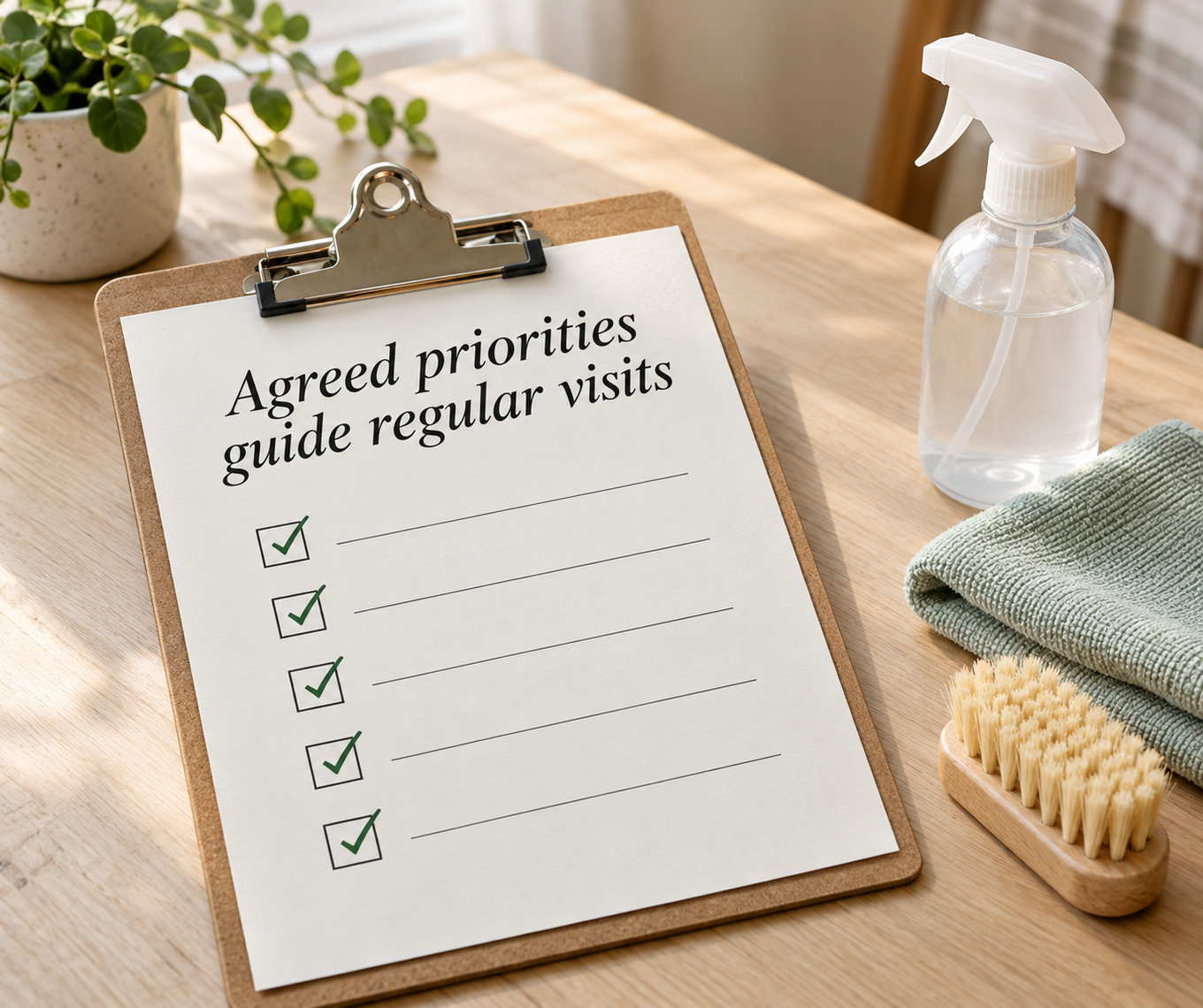
Keep your cleaning priorities clear from one regular visit to the next. We record agreed priorities in a checklist and use visit notes to guide the work. Ask about regular-service availability.
Social Media: Specify the Type of Text
When generating a social media post, tell AI the content platform, the type of text you need — such as a text-only post, image caption, carousel card copy, or video caption — and where it will appear, such as a feed or Story. These details affect the opening, length, and next step. If this text works together with the visual — attach it, so the words work with it. Try this prompt for social media posts:
Local Listing: Give Nearby Customers the Essentials
A listing update should quickly show what is available locally and where to get the full details. Keep the service, area, current availability, and contact path easy to find.
Draft a Local Listing Update with AI using this prompt below.
Next, let’s dive deeper into creating an outstanding visual. For the marketing campaign, it’ll make a part of the message in your copy easier to grasp at a glance.
Create a Visual That Makes One Point Clear
A visual can help customers see a real product, understand part of a service, or notice an offer. Start with the customer question in your Content Plan. What is the one thing the visual should make easier to understand? The image should help customers grasp the answer through what it shows. Let the caption explain the details and give the next step.
Choose the Source That Fits the Job
The right source depends on what your visual needs to communicate. You have two ways of choosing the source that matches your goal — use a real photo or generate an image. Choose according to your campaign and business goals:
- Use a real photo when customers need to see your actual product, team, place, or way of working. A photo can serve as evidence, so check that you can share it. Remove private details if it shows a customer, their property, or business records.
- Generate an image when you need to illustrate an idea rather than show business proof. A simple illustration or diagram can explain a process. A bolder graphic can draw attention to an announcement. A photorealistic scene can provide atmosphere, but it must not appear to document a real customer result or your actual premises. If you don’t have enough real materials and time to create the new ones, this option fits quite well.
Set a Visual Direction for the Campaign
Your visuals don't need the same layout, but they should feel like they come from the same business. Choose a few details to repeat across the campaign:
- Colors
- Lighting
- Photo or illustration style
- Type
- Font (if you use text on your images)
You can describe this direction in plain words. If you already post regularly, you can also attach a screenshot of your own Instagram feed or a few approved images. Tell AI which examples represent the look you want and what to carry over. If your business doesn't have a consistent look yet, choose a simple direction for this campaign and reuse it.
You might use visuals across different channels — on a webpage, local listing, social post, or email. Start with the item in your Content Plan and choose the image's format, layout, and amount of text to suit its channel and placement.
Make One Visual From Your Plan
Give AI the selected Content Plan row, relevant Campaign Strategy decisions, checked facts, and visual references. Tell it what viewers should notice first, where the image will appear, and what the caption will explain. If the image needs several labels to make sense, simplify the point before adding more detail.
Create One Campaign Visual
Check the result at the size customers will see it, including on a phone. Can you spot the main point before reading the caption? If not, enlarge the subject, remove background details, or try a simpler graphic. Check that nothing in the image implies an unverified result or changes the meaning of a real photo.
If customers need to see a process unfold, a short video may work better. Let's see how to create one for your own business.
Make a Short Video
Look at your Content Plan again. Video can work better than a photo when the message depends on movement, a sequence of steps, or a person's voice and expression. You might show a service in action, answer a common question, take viewers behind the scenes, or use a familiar point of view to make a customer problem recognizable.
Choose the message first, then how to tell it.
Step 1: Choosing the Video Format
There are many ways to make that video:
- Real footage
- An owner speaking to camera
- A voiceover over photos
- Simple animation
- A customer story shared with permission
- A relevant meme or trend
You can combine them. A trend may give you an opening, while real footage or an illustration delivers the useful point.
If you use a meme or trend, check what it means now and whether it fits your audience and business. It should help carry your supported message and next step.
Keep a video short when it answers one question or shows one action. A longer walkthrough earns its time when customers need several connected steps before they can decide. Plan those scenes and check that you have the time to make them.
Use real footage when you want to show your actual team, premises, work, or customer result. Generated clips can illustrate an idea or process, but they cannot serve as footage of work your business performed.
Step 2: Writing the Script
Once you’ve decided on the format, it’s time to draft a script. A script plans the video shot by shot: what viewers see, what they hear or read, and what each shot helps them understand. You can approve the message and sequence before spending time or paid generations on clips.
For a short video, give the script three jobs:
- Open with the customer question or a relevant point.
- Show the action, process, or proof that answers it.
- End with the approved next step.
For a longer video, build on the same structure:
- Break the main topic into related questions or steps, each with a clear purpose.
- Connect the sections with short transitions so viewers understand how they fit together.
- Add examples, demonstrations, or explanations where viewers need more context.
- Recap the key points before ending with the approved next step.
Let’s see how to draft a script for a short video with AI.
Draft a Script and Shot List
The owner uses the already approved webpage copy describing how regular visits work to review AI's proposed script. The approved version looks like this:
| Shot | What viewers see | What they hear or read | What they understand |
|---|---|---|---|
| 1 | A simple, blank checklist | On-screen: “Tired of repeating cleaning priorities?” | The video addresses a familiar concern. |
| 2 | Agreed priorities marked on the checklist, followed by an illustrated visit-note card | Voiceover: “We record agreed priorities in a checklist and use visit notes to guide regular visits.” | The checklist and notes have a role in the service. |
| 3 | A simple closing card | On-screen: “Ask about regular-service availability” | Interested households know what to do next. |
The checklist and note card illustrate a process the owner has checked. They are not presented as a customer's records or footage of a completed clean. Once the voiceover is final, the owner will add subtitles for shot 2.
Build a Draft From the Approved Script
In this example, the draft uses animated checklist and visit-note cards. Once the audio is final, the owner generates subtitles in an editing tool.
Before approving your own draft, check that the sequence is easy to follow, each shot gives viewers enough time to understand it, and the closing action is clear. Adjust anything that gets in the way of the message.
You now know how to create campaign copy, an image, and a video. The next big thing to think about is scaling your production. Your future items don't have to start with a blank prompt. An approved explanation, visual, or clip can provide material for a new asset with a clear job. AI can help adapt it to a different format or channel while you keep the message and proof accurate. Next, you'll see what to reuse and what to change.
Adapting Ready Assets to Different Platforms
When you're short on production time, running out of content ideas, or preparing content for several platforms, you don't always need to start from scratch. Repurposing means adapting existing material into a new format or version for another channel. A useful section of your webpage could become a social post, a carousel, or a short video script. This helps you find new angles, adapt your message faster, and produce more content from the work you've already done.
Repurposing is useful when another planned item can reuse checked material. It doesn't mean copying the same file and caption everywhere, and it doesn't require every campaign to start from one asset.
Keep the audience's need, supported value, proof, important limits, and action consistent. Change the opening, amount of detail, layout, pacing, sound, and call-to-action placement to fit the item and placement.
You can use the table below as a production reference on how to create and repurpose different content items with AI’s help.
| Format and placement | Give AI | Ask AI to create | Check before approval |
|---|---|---|---|
| Offer or landing page / Website | Approved message, checked offer details, proof, customer questions, voice examples | A structured page with a clear opening, useful detail, proof, limits, and inquiry or purchase path | Facts, headings, important conditions, links, and next action |
| Service update / Local listing | Approved page or offer copy, current availability, service area, contact action | A compact update that helps nearby customers understand what is available and where to learn more | Currency of details, placement limits, location information, link or contact path |
| Single-image post / Facebook or Instagram | One approved point, visual brief, caption source, brand references | One focused visual direction, concise caption, headline if needed, and alternative-text draft | Focal point, copy accuracy, readability, permissions, representation, and action |
| Carousel / Selected social channel | One process or set of related points, approved proof, card limit from the placement | A cover, one useful point per card, logical sequence, caption, and final action | Sequence, text density, visual hierarchy, accessibility, and current placement requirements |
| Short video / Facebook, Instagram Reels, or TikTok | Approved source text, script, shot list, footage or generation boundaries, brand references | A placement-ready draft with a clear opening, visual sequence, captions, and final action | Claim accuracy, pacing, caption readability, audio and footage rights, safe placement, and current specs |
| Text-led social post / Selected channel | Approved insight or offer, proof, audience context, voice examples | A scannable post with one point, useful context, and an appropriate next step | Relevance, evidence, tone, link behavior, and channel role |
| Email or direct message / Permissioned audience | Known audience need, approved offer, proof, permission context, one action | Subject or opening, focused body copy, and one prominent next step | Consent, current details, required controls, links, and action |
A customer should recognize the same offer across the webpage, listing, social media post, and any later video. The experience can still change: a page explains, an image makes one point visible, and a video shows a sequence. AI saves time by transforming checked material without giving every format the same job.
Choose the approved content you want to reuse and the item you want to create from it. Give AI the source material and the relevant Content Plan row, then name the exact format and platform. For example, turning a webpage into a carousel means selecting the relevant points, arranging them across cards, and writing a caption.
Adapt Content for a New Format
Compare the adapted draft with the source. Does it answer the planned customer question, preserve the relevant facts and conditions, and give a clear next step? Then check whether the text and visuals work in the new format. Use current platform habits and best practices as creative guidance, not permanent rules.
Once you've adapted the planned items, review the complete set together before anything goes live.
You now have channel-ready drafts built from the content plan. Give the complete set one focused approval pass before anything goes live.
Approve the Set and Publish With Control
Do the Final Check
Review the planned items together. You should avoid a situation when pieces of content each look good alone and still contradict one another when posted together.
Use one final approval checklist:
- Meaning: Does each item preserve the customer need, supported value, proof, important limits, and action?
- Evidence: Can every factual claim and piece of visible proof be traced to a checked source or real business process?
- Brand: Do the voice, visual direction, service details, and customer experience fit the business?
- Placement and rights: Is each item readable and usable in its exact placement, with the necessary captions, alternative text, permissions, rights, and disclosures?
- Business reality: Are the offer, availability, price or terms, links, delivery capacity, production time, and budget still workable?
AI can compare drafts with the production brief and flag possible conflicts. The business still checks the complete files, current facts, links, rights, and final customer experience.

For example, the owner compares the three planned items. The webpage and listing use the checklist process and invite an availability inquiry. The Facebook draft has a clear focal point, readable text, useful alternative text, and a working link. However, its headline says “Perfect results every time,” its caption ends with “Book your guaranteed slot now,” and the generated room is labeled as a recent customer result.
Which parts of the Facebook draft should the owner correct before approval?
Choose When to Publish
Your Content Plan already identifies what to publish and in what order. Before automating, choose specific days and times for those items.
- Match the content to the customer's timing. Publish early enough for people to act. A lunch offer needs to reach customers before they decide where to eat. A holiday service needs enough lead time for questions and bookings. Make sure the page or booking path is ready before publishing content that sends people there.
- Use your audience data. For each channel, check which days and hours your audience is active, if those insights are available. Review past posts for topics, formats, and publishing times associated with useful clicks or suitable inquiries. Check the time zone used in both your analytics and publishing tool.
- Choose a starting point when data is limited. Pick a plausible day and time based on your customers' routines and when you can respond. For example, a weekday lunch break or an evening could be worth testing if it fits your audience. Choose a posting frequency you can maintain alongside producing useful content and answering inquiries.
- Refine the schedule as you learn. Use future posts with similar topics, formats, and calls to action to try another time. Compare results after the same amount of time has passed since publication. Look for patterns across several posts, considering useful clicks and suitable inquiries alongside reach and engagement.
AI can help organize these decisions. Give it your Content Plan, available audience insights, past post results, business deadlines, and weekly capacity. Ask it to suggest a date, time, and time zone for each item, explain its choices, and label assumptions that need testing. Review and approve the schedule before automating it.
Automate Your Posting
Once you’ve checked and scheduled the content, you can delegate the actual posting to AI. Automation can reduce repetitive uploading and status checks.
If your AI tool can connect to your social media account, you can publish your content on schedule. Use that connection after the content and dates are approved. Give it access to the content plan, content items, plan, schedule, and social accounts the workflow needs.
Start with one item. Let the workflow upload or schedule the approved files, but keep rewriting, new claims, audience changes, paid promotion, and early publication outside its authority. Then, you can scale the automation after the successful first test.
Schedule an Approved Item Without Changing It
You can now turn the content pieces you planned into clear, persuasive assets without starting from scratch each time. Once the campaign has run, Lesson 5 will help you bring the results together, understand what the evidence supports, and decide what to do next based on the campaign actual results.
Next · Lesson 5